
Ask Tabo anywhere
Tabo pops up on any website and helps you with it:
📱 iPad & iPhone (Safari) 👈 that’s you!
A special bookmark. Set it up once (about 1 minute), then use it on any website.
Show the code (if copying doesn’t work, select it all and copy)
- 1Tap 📋 Copy bookmark code (the big button above). You’ll see “Copied!”
- 2Bookmark this page: tap the Share button ⬆️, then Add Bookmark. Change the name to 💜 Ask Tabo and tap Save.
Share → Add Bookmark - 3Edit the bookmark: tap the Bookmarks button 📖, tap Edit at the bottom, then tap 💜 Ask Tabo.
Bookmarks → Edit → 💜 Ask Tabo - 4Paste the code into the address: tap the address line (the 2nd line), tap ⓧ to clear it, then hold your finger on it and tap Paste. Tap Done.
Address line → clear → Paste → Done - 5Use it! On any website, tap 📖 and tap 💜 Ask Tabo. Tabo pops up and reads the page. Tap it again to hide Tabo.
⚡ Faster: tap the address bar, type Ask Tabo, and tap it under Bookmarks.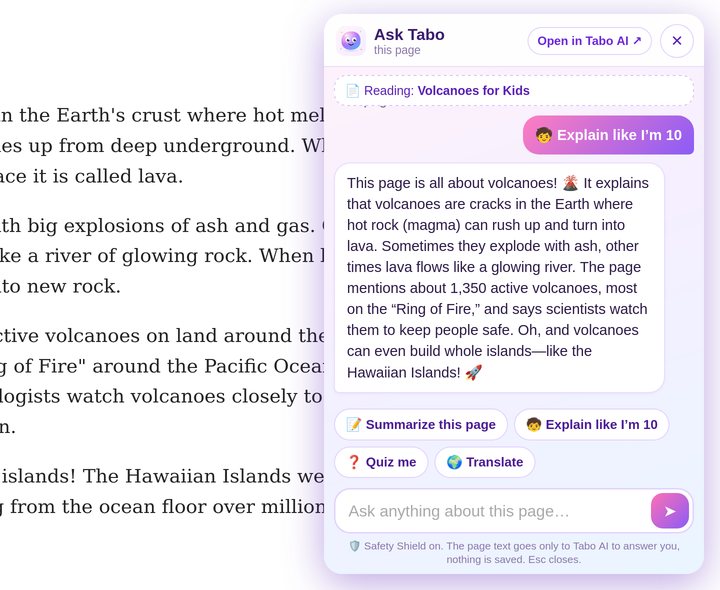
The real thing: Tabo pops up and explains the page
✅ Select some words first, and Tabo only reads those.
🔒 Some websites are extra strict (like GitHub). Then a 💜 Open Ask Tabo button shows up: tap it and Tabo opens in a new tab with the page.
💡 Use it in Safari itself (not inside the Tabo home-screen app).
💻 Computer (Chrome, Edge, Firefox, Safari) 👈 that’s you!
Drag this button up to your bookmarks bar:
- Can’t see the bookmarks bar? Press Ctrl+Shift+B (Mac: Cmd+Shift+B).
- Drag the purple 💜 Ask Tabo button onto the bar and let go.
- On any website, click it. Click it again to hide Tabo. Esc closes it too.
🧩 The real extension (Chrome & Firefox on a computer)
A Tabo button in your toolbar, a right-click “💜 Ask Tabo about this”, and the shortcut Alt+Shift+T.
Chrome / Edge
- Unzip the file (double-click it). You get a folder called ask-tabo.
- Go to
chrome://extensions(Edge:edge://extensions). - Turn on Developer mode (top right).
- Click Load unpacked and pick the ask-tabo folder.
- Click the puzzle piece 🧩 and pin Ask Tabo 📌.
Firefox
- Unzip the file.
- Go to
about:debugging#/runtime/this-firefox. - Click Load Temporary Add-on… and pick manifest.json inside the ask-tabo folder.
- ⚠️ Firefox removes it when you restart Firefox (until it’s published on Firefox Add-ons), so just load it again.
On iPad/iPhone, extensions need an App Store app, so use the bookmark above instead 👆
🛡️ Kid-safe
The Safety Shield checks your question, the page and every answer. The page’s words go only to Tabo AI to answer you. No accounts, no uploads, and nothing is saved online.